Mostrando postagens com marcador Android. Mostrar todas as postagens

segunda-feira, 6 de fevereiro de 2012

Monster Puzzle RPG - My Game

So I released in the last few days a game called Monster Puzzle RPG. It's my third game in the Android Market. It's not successful so far, though. I made it together with my cousin, he told me about an interesting mechanic he wanted to pursue and, after some convincing, I went along with it.

Download Monster Puzzle RPG on Android Market!

Monster Puzzle RPG on ModDB!

Let's analyze the game(our own game xD), then.

Gameplay
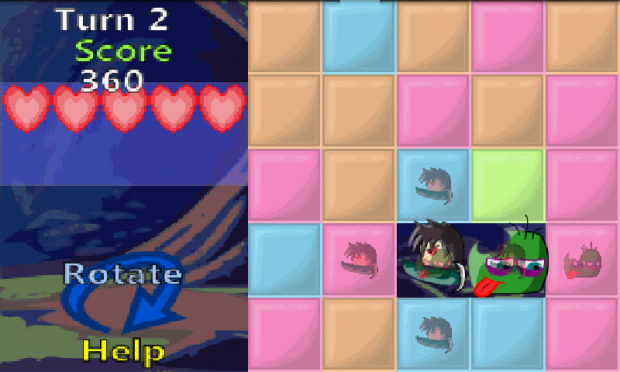
The main mechanic of the game is a grid. A grid of blocks where you have to destroy the blocks and rotate the screen to get an advantage, so you can avoid AND attack the monsters. It's feels quite puzzle-ish, which is why it has the puzzle in it's name. To reinforce the puzzle aspect, I decided to grade the player based on his score and allow the player to retry the stage freely to increase his rank, similar to Angry Birds.


A picture of the puzzle-battle thing


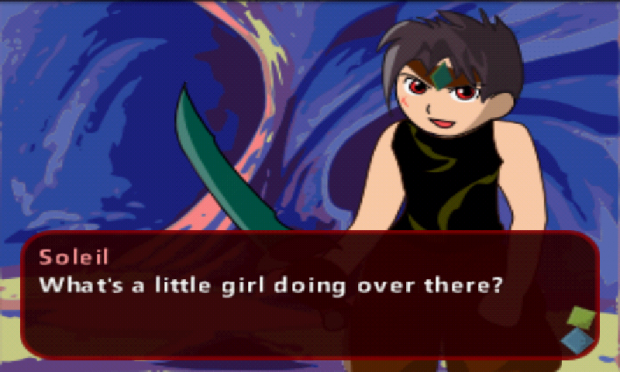
While not inside a puzzle-battle, you proceed through the story in a visual novel manner, similar to games like 999. This way of telling the story was chosen because it's easier and faster to make, since we are indies, but even so it's still an effective way of telling a story, I believe.


We went for an sort of addictive gameplay thing where you kinda wanna make yourself unlock the S rank in every stage. Not sure if it worked, though.

Story
We went with a traditional medieval theme and a story about a treasure hunter that's looking for an specific treasure. I think that it fits well with the puzzle theme and that isn't integrated in to the gameplay yet, I suppose. The story is light-hearted and develops as Soleil, the main character, interacts with his companion, a little girl by the name of Ciel. They are both happy people, so the story stays warm through the demo, but if we continue the game it will go deeper in to darker themes.

Graphics
We went with pastel colors since we find that lighter on the eyes, so light colors are seemed though the entire game. The graphics are mainly vectorized stuff. We're not graphics specialists, but the game still went nicely, we believe.

Sounds
The sound effects are generic stuff, but they fit well. The music was compoused my cousin, who's really amazing and managed to create some cool songs for the game. We went with MID stuff, which kinda limited his potential, but the musics are still great and might justify a download, I hope. He used a program called Fruity Loops Studio

So there you have it! So the game still isn't successful(we hope we can turn that around), but we do not thing the game is faulty, it's just a matter of exposion.

quinta-feira, 22 de dezembro de 2011

LeadBolt - Android Games Monetizing

So as of late I've started trying to monetize some games and applications.

I like to keep two things at heart when monetizing a game:
  1. Avoid damage to the game experience
  2. Avoid making people angry

Banner advertising - I don't like it

Google has a service called AdMob, as you probably have heard if you read anything about the subject. I like to stay away from AdMob. They are basically little banners you put in your app and you get money for clicks or impressions. You really need a LOT of traffic to get significant revenue. And, to me, they feel kinda cheap. You're tarnishing the game experience for so little gain, since they actually rely on being "in-screen". I think they should be avoided.

Content Unlockers - I like those

So I've started using LeadBolt. LeadBolt has ads similar to AdMob, but I don't use those types of ads. What I use are content unlockers. That stuff is cool because you're basically making some of your content "premium". It works like this: the player has to complete a task in order to complete the ad, and then the game continues. Or you could give a reward if the player completes the ad. Click here to see how LeadBolt Unlockers work!

LeadBolt, my favorite ad network so far!


It's kinda like paid content, but the player doesn't waste any money. But you get paid. So that's great. Once I get some numbers to show on this, I'll show it.

LeadBolt also has notification ads...

Notifications - Evil

Notifications ads are evil. Basically, notifications appear on the user's phone even after the game or application is closed. They don't tarnish the game experience. They generate great revenue.

But they make people angry. People really hate those, seriously. I don't really wanna be hated nor do I wanna cause headaches to people in order to try and earn money. Anyways, they are available through LeadBolt, but I don't use it. You shouldn't, either.

Air Push is another ad service that supports those notification types. Avoid them.

And what else?
If you wanna use LeadBolt too, you should sign in through here! That way I get a bonus when you sign up, why would you not want to help me, right?
Another service that has caught my interest is TapJoy, it has a virtual currency kinda system to it, I'll check it out better when I have time.

Two other great blogs on monetizing with the Android Market areeee:
Making Money With Android! - A really cool guy, who gives a lot of helpful feedback on his monetizing journeys. Many graphics and data for you to crunch, also a good forum.
Trilena Games -  Two girls that are growing in the Android business. They are what got me in to LeadBolt, they also have great data and are really nice girls that are just so helpful. Definitely pay their blog a visit and check their applications out!

Well, peace. Have a merry Christmas, you all!

terça-feira, 20 de dezembro de 2011

Publishing an Android Game: Android Market and SlideME

Where dreams get made and dreams get destroyed.

Let's first talk about the big fish:

Google's Android Market

So, if you've been following my guide and made a libGDX game, you could put it on the Android Market. If you're willing to pay 25 dollars. Yes, there's a fee involved, that can be a big turnoff for many people. I paid the fee .Sometimes I wish I didn't, because there are some alternatives to the Android Markets and they may even be more profitable than it.
Android Market. Pretty, huh?

Anyways, if you wanna pay the fee, you need a Google Merchant account. If you wanna to charge for stuff instead of giving away your games for free( I do that... ), you MAY need an AdSense account too. That depends on your country. My country, Brazil, totally required an AdSense account so I had to write a blog to get one. The one you're reading right now, actually.

I don't really have all that much to add about the Android Market. I always find it a pain to prepare all of the promotional images, banners and icons, so you should take care of that before hand. You also need to sign the app, which Eclipse makes it easy.

Some google information on getting ready to publish:
Preparing to Publish

Some images you need are a Icon of 512x512 and, optionally, a promotional banner of 1024x500 and a promotional image of 180x120. You can put up a video on youtube if you want to, so you can link it in your Android app page.

Try to really describe the best points of your application in the description, instead of just throwing around random key words. Try to use good key words but wrapped in a text that makes sense. Sorta.

Remember that if you set your app to paid in the Android Market, you can't change it to free. The opposite is also true. That can be bad.

So, let's talk about a friendlier alternative

SlideME

SlideME is free, fast to register and requires less images than Android Market. So it's much faster to upload your app there and less painful too.
SlideME is pretty too, huh?
 
It takes less than 5 minutes to upload your app there, seriously. But there is a screening process, I'm waiting on that right now, actually, for my new game, Dream Catcher.

I'll talk about how that goes later!

More markets out there?
Of course there are! But up so far I've explored only those two, I'll give my insight on more later!
Some more alternatives from the Trilena Blog!

Make a game, publish a game, do it now! Don't procrastinate!

EDIT: As soon as I uploaded my APP, I came here to write this post. As soon as I was done writing it, my APP got accepted. That's fast. Go SlideME!

segunda-feira, 19 de dezembro de 2011

Make a Game - Publishing


Continuing the Make a Game series!
So your game is made, what are the publishing options?

My favorite Publishing spot

I think the best place to try and publish is Desura:


The Desura Logo
They kinda like Steam, but more Indie oriented. That doesn't mean it's easy to get in, though. I got turned down on my first attempt to get published there. It's still easier than getting in to Steam, I think.

In case you don't know, those are online stores where you pay to download games, they are a new trend in the industry.

The good thing about Desura is that it doesn't discriminate too much on how your game was made. Whether it's a LibGDX Java game or an Unity game for the browser, you can put it up in Desura, assuming they accept it, of course.

Desura doesn't want me, I wish they did!
If you wanna get in to Desura, go to ModDB first, it's Desura's sister site, in there you can put up demos, images and get feedback from the Indie Community, to make your better until it's accepted in Desura. You can even contact the higher ups for their feedback in to getting your game published! It's also good for getting some attention to your game!

My game is a silly Flash Actionscript game...

So go to Kongregate! They host flash games and a lot of people make a good amount of money there. You basically get money from number of plays, if I'm not mistaken. I have a nice, warm feeling about the flash game making community. There are a lot of others site to publish on flash, though, but Kongregate is my favorite.

What about Javascript and HTML?

A good place would be the Chrome Web Store, since I'm fond of Google. You could also put it on Facebook, same as flash games!

What about Mobile Games?
If you've been following our guide and made a game in libGDX, you would probably want to publish it for Android as well as Desktop. As far as Android goes, there are a lot of markets to publish in, but I think the most important one is the Android Market. We'll also visit other markets for Android later (like SlideME ) , since it's my current focus! We'll also talk about other ways to make moneys with a mobile game ;)

A deeper read on the Mobile Android Markets: Android Market & SlideME

Ok, what do I do?
If you made the game in libGDX, publish an Desktop version on Desura or ModDB and publish the Android version on a Android market!

Now!

segunda-feira, 14 de novembro de 2011

Make a Game - libGDX architecture

I'm gonna start talking about the basic of libGDX architecture, so you can understand how to program in it better. The tutorials and explanations are a little bit fragmented, so I'll try to unite what you need to know here.

First off, if you don't know Java or Object Orientation, you should at least read something about objects and classes:
About abstraction, classes and objects
Objects, Classes and Interfaces
You need to have libGDX setup too:
Setting up libGDX

The Game and Screen class
The Game class has all the functionality ready to start up a game, it can be used as an effective starting point for your game in general. Basically, the desktop and Android projects call up a method to load an ApplicationListener, which is an interface that allows the game "to be loaded". The Game class is, by itself, a ApplicationListener. By extending the Game class, you're also putting up some extra functionality, like Screen support. It's better than implementing ApplicationListener by yourself, like some examples do.

The Screen interface can be used to describe a screen your game. You can implement this class and then set it to the game class for it to be displayed. This allows you to change screens easily and allows you to organize your code better.

Examples: Screen and Game classes, changing screens and context

SpriteBatch and Textures
This is what you use to draw images. You go to the render method of a Screen, then you start up a SpriteBatch with batch.begin( ), draw, then you call batch.end( ).
There are a bunch of drawing methods to use. What I do, though, is create a texture with an image, and then use the batch to draw that texture. You create the texture inside the show method of the screen and you draw it in the render method.

Here goes a screen code that draws an image devil.png. You're gonna need the image in the assets folder for this to work:

 package game;  
 import com.badlogic.gdx.Gdx;  
 import com.badlogic.gdx.Screen;  
 import com.badlogic.gdx.graphics.GL10;  
 import com.badlogic.gdx.graphics.Texture;  
 import com.badlogic.gdx.graphics.g2d.SpriteBatch;  
 public class CopyOfMainScreen implements Screen {  
      private SpriteBatch batch;  
      private Texture texture1;  
      @Override  
      public void show() {  
           batch = new SpriteBatch();  
           texture1 = new Texture(Gdx.files.internal("devil.png"));  
      }  
      int x = 0;  
      int y = 0;  
      public void render (float delta) {  
           if(Gdx.input.isTouched()){  
                x = Gdx.input.getX();  
                y = Gdx.graphics.getHeight() - Gdx.input.getY();  
                //do something with the input!  
           }  
           Gdx.gl.glClear(GL10.GL_COLOR_BUFFER_BIT); // This cryptic line clears the screen.  
           batch.begin();  
           batch.draw(texture1, x, y);  
           batch.end();  
      }  
      public void resize (int width, int height) { }  
      public void pause () { }  
      public void resume () { }  
      public void dispose () { }  
      public void hide() { }  
 }  

Handling Input
There are two ways to handle input in libGDX, by polling or by callback events. At this point I'll talk only about polling since it's easier to understand.
You can use the following code to check if the player is, for example, touching the screen, and then getting the coordinates of the touch.
           if(Gdx.input.isTouched()){  
                x = Gdx.input.getX();  
                y = Gdx.input.getY();  
                //do something with the input!  
           }  
Let's say you wanna draw the texture where the player touched, change the render method in your screen to this:

      int x = 0;  
      int y = 0;  
      public void render (float delta) {  
           if(Gdx.input.isTouched()){  
                x = Gdx.input.getX();  
                y = Gdx.graphics.getHeight() - Gdx.input.getY();  
                //do something with the input!  
           }  
           Gdx.gl.glClear(GL10.GL_COLOR_BUFFER_BIT); // This cryptic line clears the screen.  
           batch.begin();  
           batch.draw(texture1, x, y);  
           batch.end();  
      }  

You need to use getHeight because the coordinate system of the input and the drawing are different, and I'm not sure why.

So, this is it
On another post I'll talk about sound and animations in libGDX, but let's take it one step at a time.
Next, I'm going to show you the code I created for our little game.

sexta-feira, 11 de novembro de 2011

Make a Game - Beginning!


The other articles of Make a Game:


________________________________________________________
This is the Make a Game series, in which I'll go through the entire process of making a game. My engine of choice will be the libGDX. This is me preparing for Ludum Dare of December, so if you follow this, you'll be prepared too! :)

And what is Ludum Dare and why should I care?

Why libGDX? 

  1. It's free
  2. It's Java
  3. It allows me to write a game and get the result in both "pure" Java and Android
So while it's true you won't get any money from the Ludum Dare itself, we'll be looking at ways to make some money with our game :)

Setting up libGDX

First and foremost, you need to setup a project with the engine, and this link below will guide you through it:
Setting up a project with libGDX

Just skip the steps about Android setup if you do not want to work with that right now. It's best to learn how to setup the project by yourself, but I might post a project already all setup for you to jump straight in to development. Kinda.

I can't setup libGDX...
You could download an project already cofigured and go from there!
Try to download one of the open source demos:
libGDX repository Demo projects
You're gonna need a subversion tool, though...
like Tortoisesvn


Play around with libGDX
While I don't get around to writing the rest of the series, why not take a look at some of the tutorials about drawing images?
Drawing images with libGDX

Our next step
We'll start defining what kind of game we're going to make, so we'll take a step back in programming and take a step in design. 

segunda-feira, 7 de novembro de 2011

Integrating Facebook and Twitter in to your Android app

Today I'll show the way to integrate Facebook and Twitter in to your Android app!

Don't know what Android is? Wanna get started? Follow this link:
Getting started on Android!

So you have a game and you have that one great idea to integrate in to the social networks that will really launch it up and it'll be great for marketing? Or maybe a new gameplay mechanic that uses those? Tell me about them, because I can't really think of any great uses.

Or if you don't wanna make a game per see, but you have THE idea for an application that uses those networks that will net you endless money? Well, let's get going then.

Lucky for you, both Facebook and Twitter are really easy to integrate because most of the work is already done in the internet, especially on Facebook. Twitter is a little bit more tricky to find the right resources, but I've done just that for you, dear reader. For Facebook I'm going to give you a step-by-step in to using the SDK,

Skip to the end of the post if you just want some samples :D

Integrating to Facebook

  1. Create an APP in your account
  2. Download the Facebook SDK for Android and put it on Eclipse as a library project
  3. Import that in to your Android application 
  4. Get to know the SDK by messing with the samples!
The Facebook logo. Pretty, huh?
Create an APP in your account
For Facebook, you're gonna need an account. https://developers.facebook.com/apps go here and you'll be prompted to login. In that screen you can create an application, after you've sign up to be a developer (this can be tricky, since you need to authenticate with a cellphone and stuff). That application is sort of like, the point of access your Android application will use to access the Facebook API. Keep this page open, you're gonna need to come back to it, to get the API Key.

Download the Facebook SDK for Android and put it on Eclipse as library project
https://github.com/facebook/facebook-android-sdk/tree/master/facebook go here and click on the ZIP button to download everything as a single ZIP file. Inside the ZIP, look for a "facebook" folder. That has the basic project that you need to access the API.
Then, you're gonna need to create a new Android application(any name and Android version will do) and you have to copy the contents of the "facebook" folder in to the folder your new application, replacing the files. At Eclipse, press F5 in your project to refresh and show the new changes. Then, right-click in your project and go to properties. Go to Android and check the checkbox "is a library", if it isn't already checked. You should have something like this(doesn't have to be the exact same):

It doesn't have to look exactly like this, but you get the idea
Import that in to your Android application
Right click on the project you wanna import it in to, properties, Android, in the Library lower part, click on Add. Pick the Facebook project and hit ok. Now play around with the classes!


Get to know the SDK by messing with the samples!
In the ZIP you downloaded with the SDK, there are also samples. Just create new Android projects and copy-paste the samples codes in to the projects to try them out on the emulator. Don't forget to examine the code to switch up the API Key in the code with the API key of your facebook application! Happy programming :)

Integrating to Twitter

You're going to need to be an Twitter developer, (you're gonna need an twitter account too)
https://dev.twitter.com/ go here and hit sign in, in the upper right screen. Afterwards, click "Create an APP", fill the fields, hit ok, go. Then, you need to get the Consumer Key and the Consumer Secret of your twitter application, since you'll have to feed those in to your Android App.

The twitter application you create in the website is more like a point of access for your Android App

Then you need to code the Android part:
Ok, this is how I did it... I downloaded dewaele's sample twitter project and it worked!

https://github.com/ddewaele this is his profile on gitHub
https://github.com/ddewaele/AndroidTwitterSample and this is the twitter sample.

Download it and import it in to Eclipse (with file => import => import existing projects in to workspace => Pick the folder with the sample)
This already has all the necessary libraries, easily configured. The whole OAUTH is kinda hard to code by yourself, so it's best to use this sample. Fill in the Consumer key and secret in to the Activity class. Happy programming :)


Some words on OAUTH
This is basically Open Authorization. It is a way to access a site's content without exposing password, it is used for security purposes. If you're looking in to using webservices and things like that in your applications, you would best learn a lot of it, since this is what you'll need to implement in order to integrate with any site that uses them(both twitter and facebook use them, naturally), that way you'll be able to integrate technologies that haven't been integrated before, giving you a lot of power :)

http://en.wikipedia.org/wiki/OAuth

Final words
So basically you can now use Facebook and Twitter in your applications. If the above text is too complicated, just follow these links of ddewale (he rocks):
https://github.com/ddewaele/AndroidTwitterSample
https://github.com/ddewaele/AndroidFacebookSample
But don't forget you need to be an developer in each site with an APP registered there :D

Woosh, I wrote this because I actually have do to these things for a game in a college assignment... I'll share that one with you in another opportunity :)

Comment if you run in to trouble... Go program now!
sábado, 5 de novembro de 2011

Getting started developing for Android

So, one day you woke up and decided "I wanna program for Android!", that's actually pretty smart. The mobile market is growing and although some people state the android market in particular is bad (that's an subject for later, though ), I still believe it's a good idea.

Don't know what Android is? http://en.wikipedia.org/wiki/Android_(operating_system) Wikipedia is your best friend!

I have some good news for you. It's absolutely free to start programming in Android. You just need to download some stuff and you can start programming.

You have to begin somewhere

You download the SDK (Starter Development Kit) in the link below:
http://developer.android.com/sdk/index.html 
That little green robot is the Android's mascot. He's not a robot though, he's actually an android. Why did they choose an android to be the mascot? Beats me.

After your download is done (but before installing), go here: http://developer.android.com/sdk/installing.html
You should just follow the procedures in the site and everything should be fine. And before I forget, take the Eclipse path!

About Eclipse:
Eclipse is an IDE( integrated development environment ) that will make your life easier when programming for Android, among other things.
So maybe you like Netbeans( another IDE )? Don't use Netbeans for Android! Google itself supports Eclipse for Android and maybe other IDEs can hold a candle to Eclipse, but if you try using Netbeans and it's plugin, you're inviting headaches. Believe me, I have tried!
If you don't even know what an IDE is, get Eclipse and find out by yourself how much easier it makes your life!

Will problems happen? Maybe. Just comment in the blog and I'll try to help you out!

Some known problems:
  • Try to install the SDK in a folder that has NO WHITESPACES, since that may cause bugs, maybe on the main folder of your hard disk( C: , most likely).
    • The reason for this? I have no idea.
  • You have the JDK(Java Development Kit) but Android SDK Installer says you don't. Well, just hit back once and advance. It should work.

Afterwards you can try to setup the Hello World example.

Ok, now what?

Congratulations if you have setup the SDK, got the emulator running and everything.

Just so you know, Android uses Java as an programming language. I believe that at this point, you have 3 choices:

  • Java is a popular, useful language. Why not program in Android AND some basic Java at the same time? Skip this if you already know some Java.
  • If you want to program any type of application in Android( not just games ), using the native UI( user interface ), maybe get some money in the Android Market, then you should study some basic android:
  • Wanna program for Android solely for games? Then it's better to jump in to a framework straight ahead!
This is Android's native User Interface
But first, what is this native UI that I speak of? It's the default buttons and interfaces that Android comes packed with. You should use them for creating some basic applications, since it saves time and the users are already used to them. You can try to design a game using those things, and while it is possible, it's not a good idea at all, because you'll have little control over rendering (the drawing of your game's graphics), which is BAD, among other problems. And I speak of experience, I've already made that mistake. More about that later, though :D

By using an Framework for games, somebody else has already optimized and organized the way you should handle rendering, input and sound, among other things, which means you'll face less problems trying to design your games and fighting bugs.

One of those Frameworks is AndEngine!

http://www.andengine.org/

Which is pretty well established already and uses OpenGL (Open Graphic Library) , which is a great skill to start picking up. I've never used AndEngine, though. Instead I'm using another Framework... Libgdx.
http://code.google.com/p/libgdx/  
It has a huge trump (for me, anyways)... You program your game once, and it runs on both Desktop AND Android! And since it's Java, that means both Windows and Linux, and maybe anything that has the necessary Java Virtual Machine. Or maybe an Applet straight from the browser? You can do that too! Awesome. It uses OpenGL, like AndEngine.

Frameworks, I'm an expert, I'll make my own!
So maybe you wanna deeply learn Android games mechanics, maybe create your own framework to use in your games, giving you max control and max learning?
Then go program some stuff, get to know a lot about basic Android programmin... And then, start learning about this little guy:
http://android-coding.blogspot.com/2011/05/drawing-on-surfaceview.html

It's called a surface view. It's basically a way for you to control the rendering process completely! If you have this down(you're gonna have to know some threads, so it takes advanced Java), you'll be able to create a good framework. Just search up "SurfaceView Android" on Google and you'll get a lot of stuff.

Uhnnn, I wanna make my own Framework, but...

So maybe you don't know anything about Threads? And you wanna make a pretty good Framework? You wanna have some guiding light? Then I have a book just for you...

http://www.amazon.com/Beginning-Android-Games-Mario-Zechner/dp/1430230428

It takes you step-by-step in to creating a framework in Android and also through creating games(there are 3 game examples made through the book). It's a great read, from the creator of libGDX.

You don't have the money, though? You can still look at his Source Codes as he progresses through the chapters, building frameworks and games:

Look up SVN if you don't already know what it is, to download all the codes at once.

Woosh... I'm tired.

Well, just go program now!